

50+ million downloads across Appstore and Google Playstore
Total Lifetime Revenue: $55+ Million
WWE Mayhem


WWE Mayhem is bigger & bolder than the rest, with fast-paced mobile arcade action and over-the-top moves!
Play as John Cena, The Rock, The Man- Becky Lynch, Ronda Rousey, Undertaker, Goldberg and ALL of your favorite WWE Legends and Superstars in this high-flying, in the ring, arcade action game. Take your WWE Superstars to the next level in weekly WWE RAW, NXT and SmackDown Live challenges! Compete on the Road to Wrestlemania and lead your WWE Champions and Superstars to victory in WWE Universe.
Play through epic and marvel wrestling matches between WWE Legends and WWE Superstars to determine the greatest of all time, each with their own Signature Moves and Super Specials.
My contribution to the project
I led the overall UX direction for this game, which involved collaborating closely with designers to understand gameplay requirements, generating and pitching ideas to the team and stakeholders, creating detailed wireframes and user flows, and working with the Art and Tech teams to ensure seamless UI implementation. I also conducted multiple rounds of user testing to identify improvement opportunities and validate design decisions.
My involvement began during the pre-production phase, where we explored various fighting mechanics, input styles, and scoring systems. Extensive user testing during this stage provided valuable insights that helped shape the core direction of the title. The project team was distributed across Pune (India) and Chicago (USA), which introduced challenges in communication and alignment. I played a key role in proposing and implementing strategies to reduce friction and improve collaboration.
As the project transitioned into live operations post-launch, I shifted from a lead UX role to a supporting capacity, assisting the team as needed. This was my first project that I contributed to from initial conception through final release and into live operations, offering me a complete end-to-end experience of the game development lifecycle.
My responsibilities on the project
1. Work with the UX Manager to define the UX strategy of the project
2. Shape the architecture of the game's interface, based on the requirements and specs from the Product Owners and Game Designers.
3. Deliver clear comprehensive UX flows, IA's, and prototypes to Designers and Product Owners.
4. Leverage insights from playtests and player research to inform the product roadmap and feature designs.
5. Get the interface implemented into the game with the help of UI Artists and Developers.
6. Test the interface inside the game and follow up on technical flaws with solutions.
7. Be the keeper of human-centered design and be responsible for balancing user needs with business challenges.
8. Educate stakeholders and team members about the importance of UX and be a strong advocate for adopting best UX practices with the team.
UX approach on the title
As the lead UX designer on the project, I was briefed to direct the entire UX which involved intensive research in the pre-production phase with rapid game prototype testing, taking learnings from existing fighting and wrestling titles, mapping out user flows, journeys, and player personas. This was my first ever title where I got the opportunity to direct it. The project timeline was designed in a way that we approached one feature at a time in terms of priority. Once a decent wrestling gameplay prototype was achieved the next immediate feature that was tackled was the story mode.
Before kicking off the work on a particular feature a discussion was arranged between design, Art, and UX to understand the requirements in detail and discuss any high-level ideas. Further, I used to spend time defining the UX spec followed by the first round of run-through and feedback. At this level any high-level obstacles pointed out by any department were discussed and solved as a team. Post this I used to take all the feedback and suggestions and make necessary tweaks to the spec before pitching it to the team. Once everything was agreed upon by all the team members, I used to sit down with each department to discuss their input in the spec that was pitched which involved writing and assigning tasks.
Once the feature was implemented, we would invite players to our studio to test it and identify potential friction areas and understand the pain points. Later this user report was presented to the team by myself followed by a granular discussions on bringing in the improvements into the product.
UX Design process
As the Lead UX Designer on the project, I’ve outlined below the process of designing one of the proposed features from concept to testing and implementation.
Proposed Feature: Close to the game’s launch, our parent IP company, WWE, released a range of WWE Superstar toys and wanted to integrate them into the game experience. The brief was to design an in-game economy and system where purchasing a physical WWE toy would grant players a tangible advantage in-game, helping boost toy sales. This feature was internally titled “Toys to Life.”
Research: Following the brief, our team conducted research on existing games and products that successfully blended the physical and digital worlds. We analyzed various approaches to physical-digital integration and identified QR codes and alphanumeric serial codes as two viable methods to connect the toys with the game experience.
Solution: The final solution utilized both QR codes and serial numbers printed on the packaging of WWE Superstar toys. Players could enter the game, tap the “Scan Toy” button, and use the in-game camera to scan the QR code. Upon successful scanning, the corresponding WWE Superstar would be added to the player’s roster. Alternatively, players could manually enter the serial number printed on the box to unlock the same reward.
To validate the concept, I designed detailed wireframes and user flows for both scanning and manual entry processes. A small interactive prototype was built and tested internally to gather player feedback. Insights from this test helped refine the flow and finalize the UX specifications before implementation.
Wireframes and Flow for Toys to life
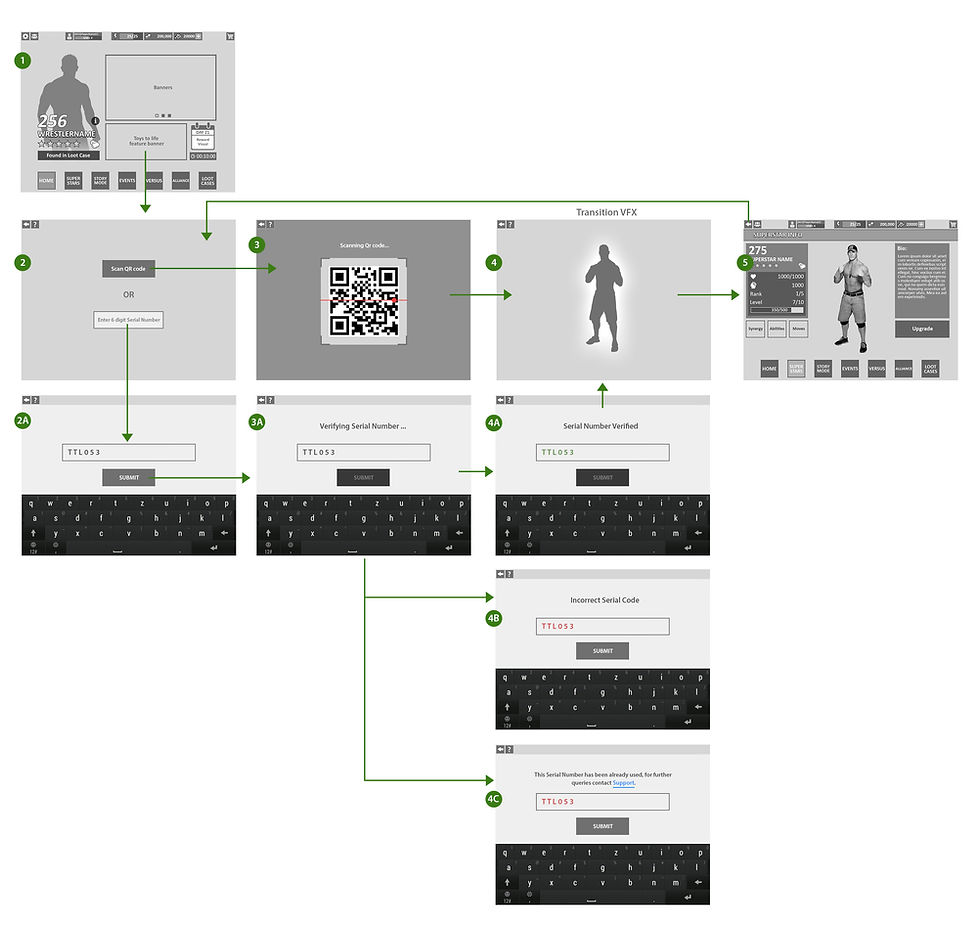
Internal User Testing
To validate the wireframes and flow the wireframes were linked to create a prototype using Invision which was tested on members in the studio outside of the core development for WWE. The following findings and insights were gathered:
-
Confirmation Clarity: When the serial number or QR code was successfully verified, the transition to the “character unlocked” screen felt abrupt. Users recommended adding a clear confirmation message or a short celebratory animation before the transition to improve satisfaction and feedback clarity.
-
Error Messaging Improvement: Participants found the “Incorrect Serial Code” message too generic. They suggested including more context — for example, specifying whether the code was invalid, already used, or entered incorrectly — to make error recovery easier.
-
Manual Entry Preference in Low Light: A few users preferred typing the serial code instead of scanning, especially under poor lighting conditions or with camera access disabled. This confirmed the need to keep both scanning and manual entry options available in the final design.
Result: After rolling out this feature successfully we were informed by the parent company WWE that this new feature has boosted the sales of the toy figurines. A lot of the users posted on the social media, videos regarding unlocking their new superstars in the game via purchasing it from physical stores. This sort of amalgamation of both the physical and the virtual world had not been done quite often before in any of the mobile games and we as a team were quite excited with its success.
Below I have shared the process of designing the UX for another screen i.e. the wrestler versus screen which is one of the crucial screens in the game where the player gets to compare their superstar with their opponent and choose boosts or make a decision to switch or upgrade their superstars.
Briefing: On the basis of the above-mentioned requirements we sat down with the designers to collect references from games that have a similar screen or flow of getting into the fight/toy. The intention was to pinpoint what common patterns we can map out from these games which will direct our approach to designing the screen. We decided to play and capture screenshots focusing mainly on screens similar to our versus screen from the best fighting game titles in the market that are commercially successful.
Here we observed that few games went with the card-style representation of the fighter while some preferred to display the 3D model of the fighter with stats displayed separately. Since card-style wrestling game is a different genre altogether and ours was a 1V1 fighting style game we decided to go ahead with the 3D representation of the wrestler with other aspects laid around it. This gave the freedom to animate the wrestlers, show off their attires without the need to restrict them in the boundaries of a card.
Requirement Analysis: Before jumping into the research and groundwork required to build the screen, we sat with the designers to understand the requirements and the goals to be fulfilled by it. To understand what all actions the player will perform while being on the versus screen.
Actions the player will perform on the Versus screen:
1. Compare their superstar's stats with that of the opponent
2. Make a decision to upgrade their superstar
3. Switch the selection of their superstar if the opponent is very powerful
4. Decide whether to equip a boost
5. Check if the class of their selected superstar has an advantage over the class of the opponent superstar
6. Heal their superstar if their health is not 100% (damage taken from a previous fight)
7. Check the synergy of classes for all the superstars selected in their team
8. View rewards to be won from the fight ahead


This exercise helped us to develop a certain direction in which we could build the Versus screen for our game that would be able to meet the goals and requirements set by the Game Designer.
Process: Based on the information obtained from the above exercise next step was to create rough sketches for the layout and narrow them down to the one that best fulfilled the requirements.

We went ahead with the the option that is green ticked since it fulfilled the needs of a Versus screen with a good balance of information spread, buttons placement, how the screen will be read by the user, etc. The next step was to create wireframes with all the finer details of the screen with regards to the superstar stat display, access to boosters, upgrade screen, rewards, etc.
Versus Screen UI Wireframe

Once the Versus screen was finalized I designed the end to end flow that covered the player landing on the Main menu, then heading to the story mode, selected a chapter, selecting the fight node and finally choosing the wrestler before they jumped into the fight. It also covered the post fight result screen which later brought them back to the node map screen to continue fighting
Logic Flow
Once the Versus screen wireframe was finalized, I created a logic flow to map how a player would navigate from the home screen to access Story Mode and how the Versus screen integrates into that mode. This flow focused specifically on Story Mode, though the Versus screen itself is a shared component across all game modes, adapting contextually to each mode’s requirements.
Building on this logic flow, the next step was to develop a detailed screen flow covering all screens. This included how players enter a mode, equip a team, engage in battles, and progress within that mode.

Versus Screen Flow

Once all the screens, edge cases and flows were laid out I got in touch with the team to run them through the flow to raise any concerns from design, art or technical standpoint. There was some feedback and thoughts that were incorpoated into the wireframes after which they were interlinked in Invision to turn it into an interactable prototype.
Internal User Testing:
We conducted a test using the Versus screen prototype on 10 members outside of the core WWE team that included a mix of casual and midcore players. We covered questions to gauge their understanding of the different screen, the end to end flow, their pain points along with suggestions and feedback to improve things futher. Following feedback was gathered.
-
Navigation Clarity: Some users found it unclear how to progress from the episode selection screen (screens 2–4) to the actual match. Adding a more prominent “Begin Episode” button or visual cue could reduce confusion.
-
Team Selection Feedback: Users occasionally weren’t sure which superstars were currently selected or locked during the team equip stage (screen 4A). Highlighting selected characters more clearly and showing unavailable/locked ones distinctly could improve usability.
-
Match Outcome Understanding: After a match, some users did not immediately understand the rewards and points system on the post-match screens (screens 8 and 13). Adding tooltips or brief animations to explain points earned and unlocks could enhance comprehension.
-
Loading Feedback: Users noted that loading screens (screens 6, 9, 11, 14, 17) lacked engaging feedback, which caused uncertainty about wait times. Including progress indicators or mini-tips could make waiting less frustrating.
-
Replay / Retry Options: On losing a match (screens 18–20), some users were unsure how to quickly retry or exit. Adding a clear “Retry” button alongside the “Back” option could streamline user flow.
-
Consistent Visual Hierarchy: Across multiple screens, users suggested that critical buttons (like “Wrestle” or “Accept”) could stand out more through consistent color usage or size, helping reduce hesitation or misclicks
All the above feedback was addressed during the implementation of the Versus screen and its flow as a part of the Story mode and all the other modes across the game.
Art UI Mock for Versus Screen

Once the team was satisfied with the results of the Art Mock stage, we collaborated with Tech to implement the screen. In parallel, I worked with the UI Artists to ensure the UI animations, VFX and SFX were properly integrated with the developers’ support. Below is the final version of the Versus screen as implemented in the game.
This was followed by a round of user testing, which helped us identify and refine a few minor issues before moving on to the next major screen: the post-fight results screen.
This was one of several complex features I designed and delivered for the game, alongside key systems such as the UX for Story Mode, Versus, Events, Alliance, Loot, and Store. Throughout this process, I ensured that the team consistently adhered to the established design system and UX principles for the title, maintaining a cohesive and intuitive player experience. I facilitated continuous alignment between the feature team and stakeholders, negotiating trade-offs where necessary and guiding course corrections under tight deadlines. By identifying quick wins and streamlining workflows, I helped ensure timely delivery without compromising quality, ultimately contributing to a polished and engaging experience for players across multiple game systems.
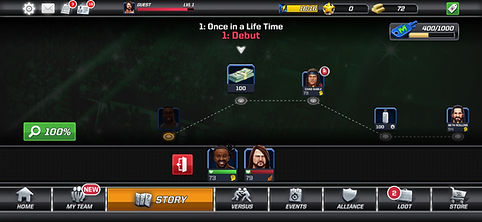
Ingame screenshots



.jpg)


