

TaskRabbit
Redesigning Task Scoping, Booking Reliability & UI Architecture on TaskRabbit


Role: Senior Product Designer (Independent Concept)
Timeline: 2 Weeks
Domain: Marketplace
Focus: Scope accuracy, Cancellation recovery, Real-time scope alerts


Executive Summary & Project Overview
Core problem: I decided to audit TaskRabbit’s iOS app after reading dozens of 1-2 star App Store, Google Play, and Trustpilot reviews complaining about Taskers cancelling on-site due to missing tools or unclear job scopes, alongside user frustration with dated UI navigation.
Rather than doing a superficial visual refresh, I paired a modern UI design system overhaul with structural solutions for three critical operational breakdowns in the booking funnel:
-
Scope Misalignment: Taskers arriving ill-equipped because descriptions are limited to plain text.
-
Destructive Rescheduling: Clients losing typed notes and photos if a Tasker cancels or asks to change times.
-
State Opacity & Dated UI: Zero persistent visual tracking for active bookings on a cluttered, visually dated home dashboard.
To solve this, I borrowed and tested UX patterns from Airbnb, Deliveroo, and Uber to design a Diagnostic Media & Equipment Scoping Flow, a Non-Destructive Task Transfer Drawer, and a Pinned Active Task Dashboard, supported by a production-ready Figma component library.
The Problem: Grounded in Public Review Data
Analyzing reviews across the iOS App Store, Google Play Store, and Trustpilot revealed that operational drop-offs stem directly from missing structural UI mechanisms:
- Tool & Equipment Mismatches: "Tasker showed up without a masonry drill for my concrete wall and had to cancel." (Text-only inputs don't force users to specify structural site constraints).
-
Data Loss on Cancellation: "Tasker asked to reschedule, but the app forced me to cancel and re-type everything from scratch." (The booking engine treats task parameters as throwaway session data rather than persistent objects).
-
Silent Booking Status & Dated Interface: "App said my task was confirmed, but when I opened it later, it showed a blank screen or 404." (Poor cached state handling paired with low-contrast, legacy typography).
Visual Design Refresh & UI Architecture
Beyond optimizing funnel mechanics, I modernized TaskRabbit's visual foundation—transitioning from dated, flat patterns to a scalable, iOS-aligned system:
-
Semantic Tokens: badge-success, badge-alert, and badge-neutral standardize status cues across task steppers and scope tags.
-
Typography Scale: Tokenized Albert Sans hierarchy (font-h1 to font-micro) enforces consistent type rhythm across all card layouts.
-
Surface Containers: surface-elevated handles elevated card wrappers, while surface-subtle frames nested adjustment details.
-
Interactive Primitives: Modular button variants (btn-primary, btn-ghost) and stateful media slots (Empty, Uploading, Error) align intake and approval actions across screens.

Pattern Provenance: Borrowing Industry Mental Models
To ensure an intuitive, friction-free user experience, I grounded my designs in established mental models. Rather than forcing users to learn new behaviors, I adapted familiar interaction patterns from top-tier apps they already use daily:
-
Airbnb (Host Listing Diagnostic): Airbnb forces hosts to upload photos and tag specific amenities (Dedicated Workspace, EV Charger) so guests know what to expect. I applied this to task scoping so clients attach diagnostic photos and select tool requirements upfront.
-
Deliveroo / Uber Eats (Order Recovery): If a courier drops an order, Deliveroo doesn't force you to pick your food again—it silently transfers your active cart to a new rider. I adapted this into a 1-tap Task Transfer Engine that preserves client inputs if a Tasker cancels.
-
Uber (Live Driver En-Route Sheet): Uber pins your driver’s location and arrival status directly on the primary dashboard. I brought this pattern to TaskRabbit's home tab to eliminate status-checking anxiety.

Uber En-Route Tracking: Pins real-time driver ETA, contractor credentials, and specific pickup instructions onto a draggable home-screen bottom sheet.

Airbnb Host Setup: Uses structured photo tours and explicit amenity tags to establish clear expectations prior to booking.

Deliveroo Order Recovery: Employs a persistent cart session and bottom drawer so active order data survives driver disruptions.
Solution Architexture & Wireframe Flow
1. Diagnostic Task Scoping (Airbnb Pattern + Visual Polish)
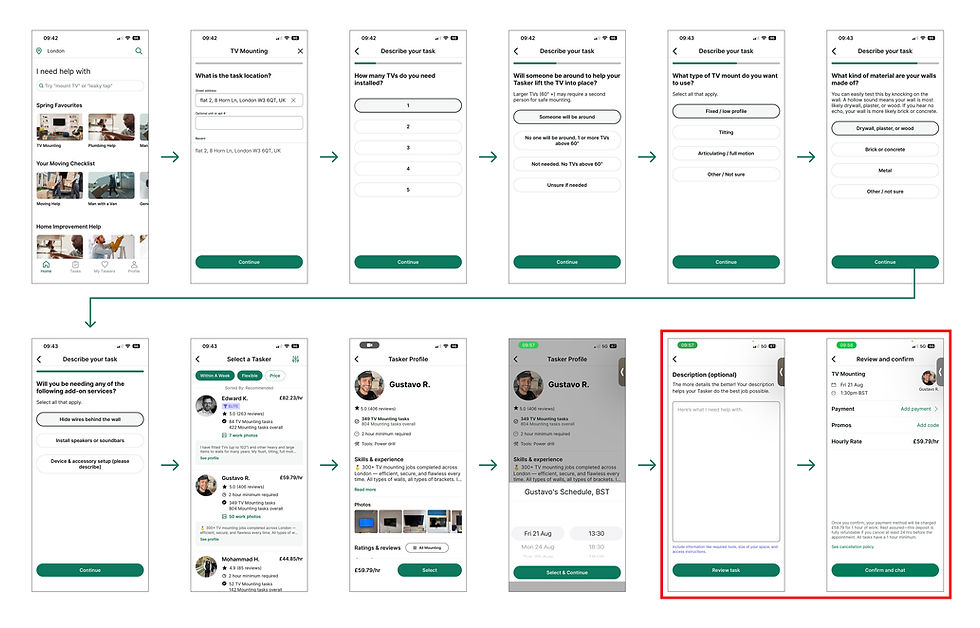
Problem statement: As noted above, a gap was identified in the user flow when registering a new task for a tasker. The current booking flow lacks a step for users to upload photos and videos of the site, which would give taskers a clearer understanding of the job. Relying solely on text inputs fails to prompt users to detail key structural constraints. This same issue is highlighted in the existing flow from the live app below.
Solution: I've introduced the option to provide photos and videos alongside the existing text description. As a stretch goal, we added an AI feature that scans the user’s submitted media and text to automatically identify the required tools and materials. Because this feature impacts both the description screen and the payment confirmation screen, we carefully redesigned both user interfaces to seamlessly support the new workflow.

2. Improved task description screen with option to upload photo and videos.
3. AI failed to detect the tools and materials required based on the photos/videos and description
1. No option to provide photo/videos.
Feature Overview & Workflow
User Input & Media Upload
-
Media Limits: Users can upload up to 5 photos or one 10-second video.
-
Task Context: Users provide a text description detailing the task requirements.
AI Analysis & Auto-Mapping
-
Automated Scan: Clicking the Review Task button triggers AI analysis of the uploaded media and description.
-
Equipment Generation: The AI automatically populates a recommended list of tools and materials in the "Auto-mapped equipment for Tasker" section.
User Review & Manual Customization
-
Item Adjustments: Users can manually add any extra tools, equipment, or materials missed during the initial AI scan.
Handling Incomplete Data & Low-Quality Media
-
Error State Trigger: If media is low-quality/blurry or the description lacks detail, the AI alerts the user via a clear error state.
-
Baseline Selection: Instead of failing completely, the AI falls back on the user's previously selected task preferences to recommend baseline equipment.
-
Direct Communication: Users can further clarify task specifics and tool requirements with the Tasker through chat.
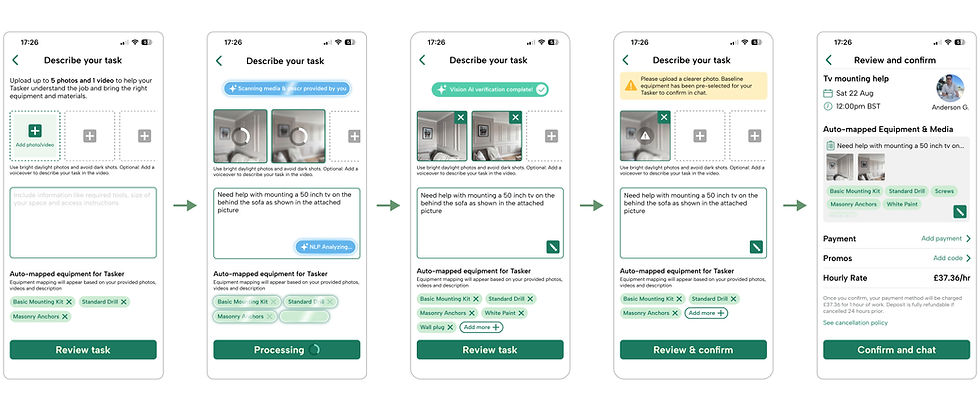
1. User adds the photos/video along with the text description of their task
5. Before completing the payment user has the option to alter any requirements.
3. Once scan is completed, AI lists all the required tools and materials. User still has option to add/remove anything from the llist.
4. Once scan is completed, AI lists all the required tools and materials. User still has option to add/remove anything from the llist.
2. AI feature scans the photos/video and the text description to identify the tools and materials required for the task
Prototype Mechanics & State Transitions
To demonstrate the full intake mechanics, this prototype validates the key motion triggers, AI processing states, and visual feedback loops:
Diagnostic intake and camera access: Tapping the media slot invokes the native ios photo picker modal, transitioning the input contrainer from and empty state to an uploading thumbnail preview
AI Analysis & Auto-Tagging: Once photos and plain-text descriptions are submitted, an active AI scanning status triggers automated scope extraction. The system processed visual context (e.g. concrete wall surfaces) to infer required tools and materials automatically.
User Control & Refinement: Generated tags populate as interactive chips (Active/Inactive). Users retain full control to manually add, edit, or clear any tool requirement before confirming the task ensuring complete accuracy before handoff to the tasker.
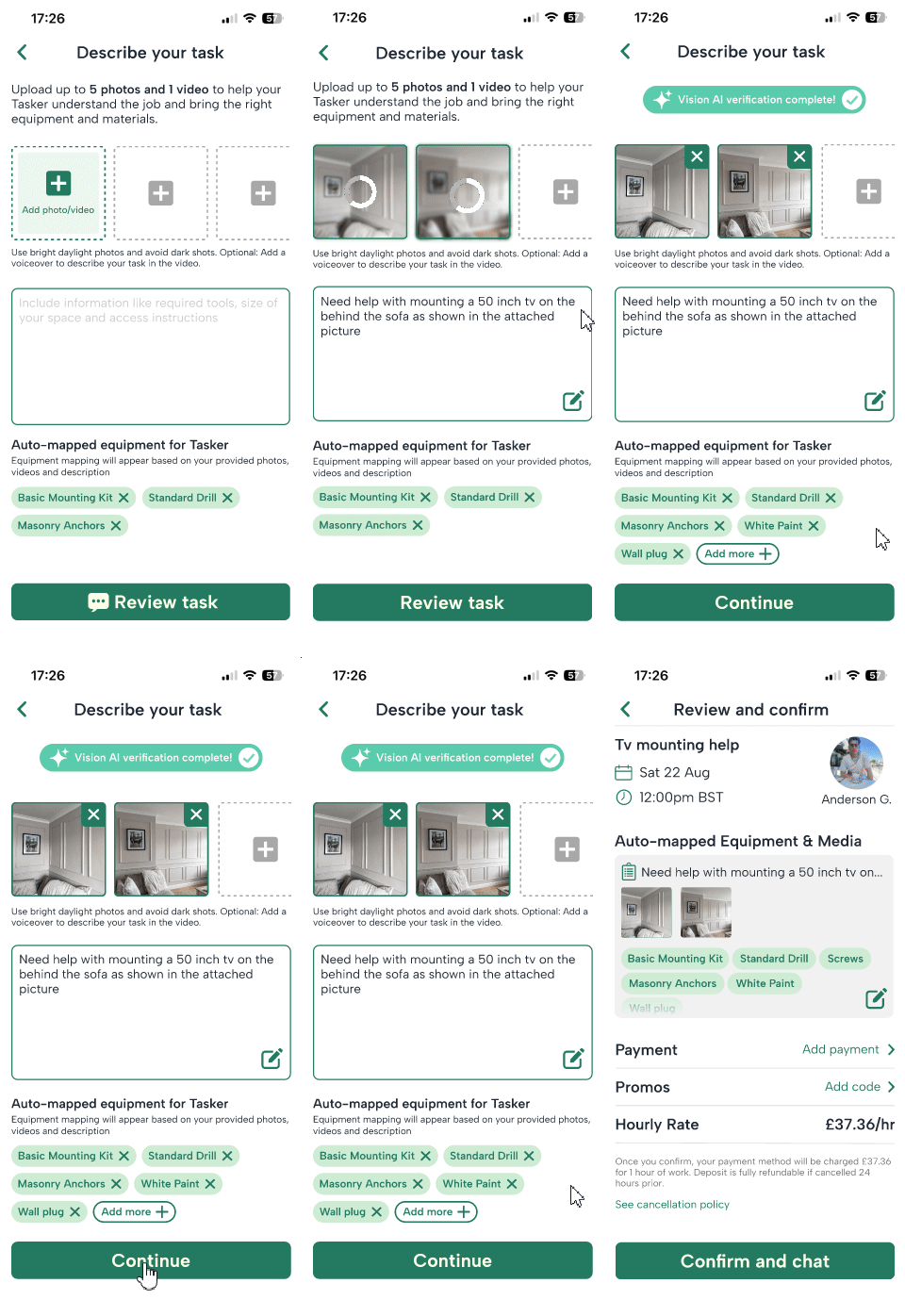
Why it works?: Detailed site constraints are now available for taskers to review before accepting a task. This directly reduces instances where inappropriate tools or materials are brought to the site which was a primary cause of task cancellations, rebookings, wasted time and effort, and the logistical friction of processing user refunds.
2. Non-Destructive Task Transfer (Deliveroo Pattern)
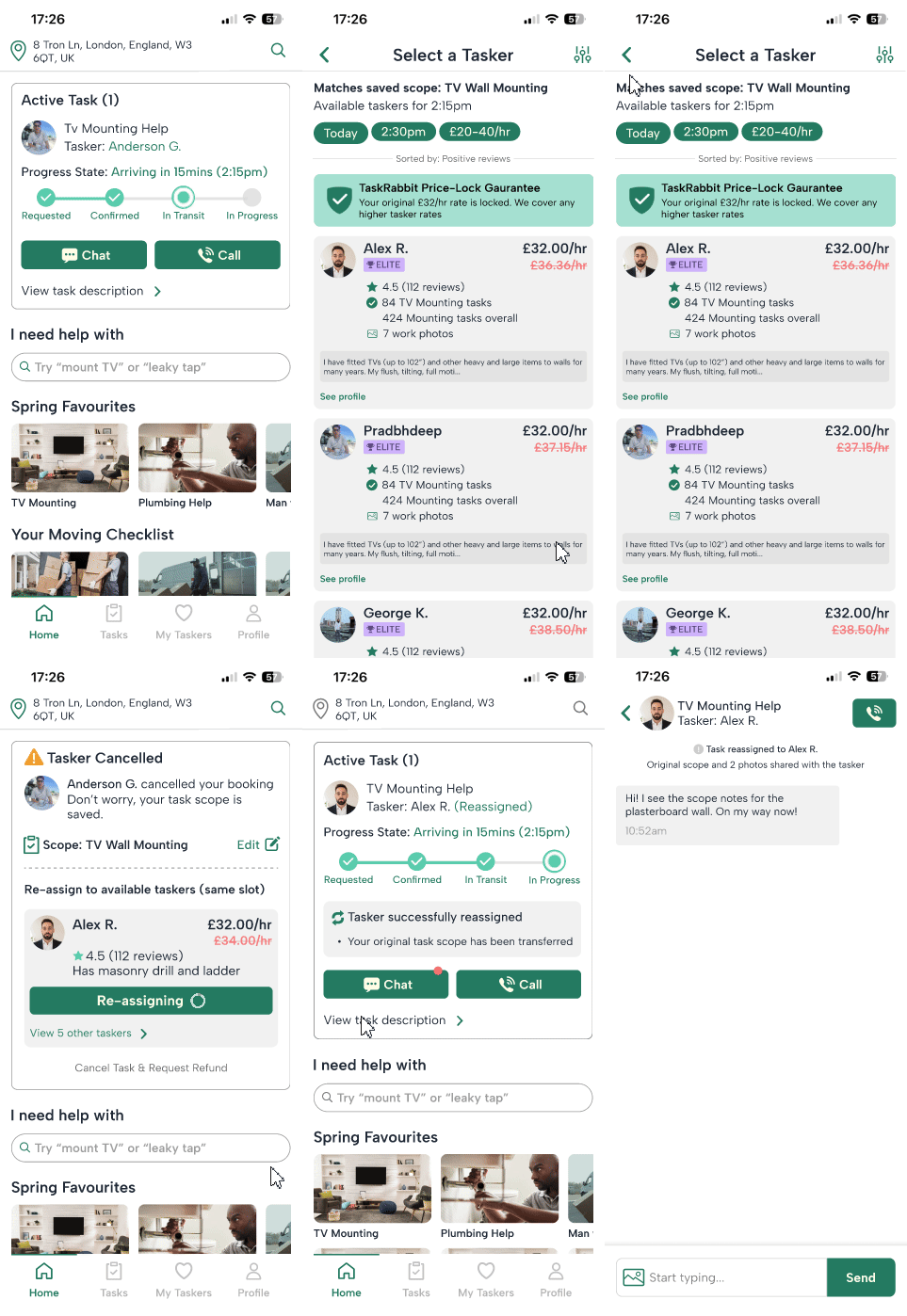
Problem statement: When a Tasker cancels an active job, forcing users to restart the booking funnel manually damages trust and degrades conversion retention. The app previously treated cancellations as complete resets, requiring users to repeat the input process entirely. By failing to preserve task parameters (scope, photos, and time slot), the platform placed an unnecessary operational burden on the user. Redesigning this flow to auto-transfer scope and suggest instant replacements directly mitigates churn and protects marketplace trust.
Solution: When a Tasker cancels an active job, forcing users to restart the booking funnel manually damages trust and degrades conversion retention. The app previously treated cancellations as complete resets, requiring users to repeat the input process entirely. By failing to preserve task parameters (scope, photos, and time slot), the platform placed an unnecessary operational burden on the user. Redesigning this flow to auto-transfer scope and suggest instant replacements directly mitigates churn and protects marketplace trust.
Positive Flow: When user accepts a tasker from the new recommended list and goes ahead with the proposed work

1. When a tasker cancels, user gets a notification card on their home screen with options to re-assign it to someone else
2. User can either go with the recommended tasker or look for another one from the list
3. Once user has selected a tasker their task gets re-assigned to them along with the detailed scope of the work
4. Once the tasker and the user get matched, they can communicate with the user and proceed with the required work
Negative Flow: When user cancels the task and requests a refund when the original tasker cancels last minute

1. If a tasker cancels user also has the option to cance their task request completely and ask for a full refund
2. User gets a confirmation popup with a detailed breakdonw of the expected refund amount
3. Once a tasker has been cancelled user gets a confirmation on their home screen along with the estimation for their refund of money
Feature Overview & Workflow
-
Trigger & Notification State (Home Screen)
-
Context Preservation: A collapsed scope bar confirms that all original task parameters (photos, notes, tools required) are safely preserved.
-
-
UI Action: The Active Task card on the Home Screen instantly converts into an amber alert state (⚠️ Tasker Cancelled).
-
System Event: The original Tasker cancels the booking.
-
Primary Match & Instant Swap
-
Recommended Match: The system algorithms select the top-rated available replacement (Alex R.) who matches the time slot and tool requirements.
-
Action: The user taps the primary green CTA Re-assign to Alex to confirm the swap in a single tap.
-
-
Alternative Discovery (Seperate screen)
-
Secondary Gateway: If the recommended match doesn't fit, the user taps View 5 other taskers >.
-
Seperate screen: A scannable list of alternative matches sorted by rating, equipment, and hourly rate are displayed in a seperate screen.
-
Action: Selecting any provider transfers the scope instantly.
-
-
Multi-Surface Synchronization
-
Home Card Update: The card updates to display the new Tasker’s details, resetting the status stepper to In Transit with clear progress feedback (🔄 Tasker successfully reassigned).
-
Chat Thread Sync: An automated system event logs inside the chat thread (⚙️ Task reassigned to Alex R. Original scope attached), allowing the new Tasker to acknowledge the notes immediately.
-
-
Safety Net / Hard Cancellation (Edge Case)
-
User Fallback: If no alternative Tasker works, the user taps Cancel Task & Request Refund.
-
Modal & Receipt: A center dialog opens to confirm that no cancellation penalty applies, breaking down the full hold release (£45.00) and estimated bank processing timeframe (3–5 business days).
-
Cancellation Recovery & Rate-Lock Motion Mechanics
To demonstrate friction free task recovery and immediate price transparency during disruptions, this prototype validates the low friction reassignment flow, rate-absorption feedback, and persistent state restoration:
-
Triggered Drawer & Context Preservation: Upon a Tasker cancellation, the task progress tracker updates to notify that the tasker has cancelled. All previously entered photos, room constraints, and job specifications are preserved to prevent data loss or manual re-entry.
-
Guaranteed Price-Lock Transparency: The top banner displays a shield-check trust indicator alongside a clear price-lock notice. Replacement options show higher market rates crossed out to visibly signal that TaskRabbit absorbs all rate variations under the Happiness Guarantee.
-
Instant Re-Booking & Feed Sync: Tapping Confirm & Transfer Task triggers a localized loading morph on the primary card. Upon confirmation, the drawer dismisses to reveal the updated Active Task card with the new Tasker's details and refreshed arrival ETA seamlessly pinned to the home feed.
Why it works?: Instead of forcing users into an all-or-nothing rebooking path, this flow gives them full control over their money and schedule when a Tasker cancels. The primary screen immediately offers a one-tap replacement (Re-assign to Alex) while keeping the saved scope intact, but clearly exposes a secondary path to cancel completely. If chosen, a high-transparency modal breaks down the exact refund math showing pre-authorized holds vs. fees before final confirmation. Once cancelled, the home feed updates with a persistent banner confirming the refund timeline (3–5 business days) alongside a primary CTA to start fresh, removing anxiety around hidden charges and abandoned task states.
3. Redesigning Mid-Task Scope Adjustments & Price Transparency
Problem Statement: During active home-service tasks, unexpected issues frequently arise such as encountering solid concrete behind plasterboard that end up requiring extra materials or labor. The current approach in TaskRabbit, Taskers handle these additional expenses by sending raw text messages and receipt photos directly within the chat feed. The added charges are then tacked onto the final invoice at task completion.
This current flow introduces two major pain points:
-
Post-Task "Bill Shock": Customers are asked to settle unexpected charges after the work is already finished, leading to payment disputes and low CSAT (Customer Satisfaction) scores.
-
Buried Context: Expense details get buried under conversational chatter in the chat thread, making it difficult for the user to quickly review, verify, and formally approve the price change.
The Proposed UX Strategy: Proactive Pre-Approval Cards:
Rather than hiding financial adjustments in chat logs or delaying charges until the final invoice, my approach surface-levelizes scope changes directly on the primary Active Task card through a dynamic alert state.
-
Upfront Transparency: Forces explicit 1-tap pre-approval with real-time cost breakdown (+£8.00) before the Tasker continues work.
-
Photographic Evidence: Anchors a direct link to the Tasker’s photo evidence right next to the approval action.
-
Audit Trail: Automatically syncs the decision back to both the central billing system and the chat thread for contextual record-keeping.

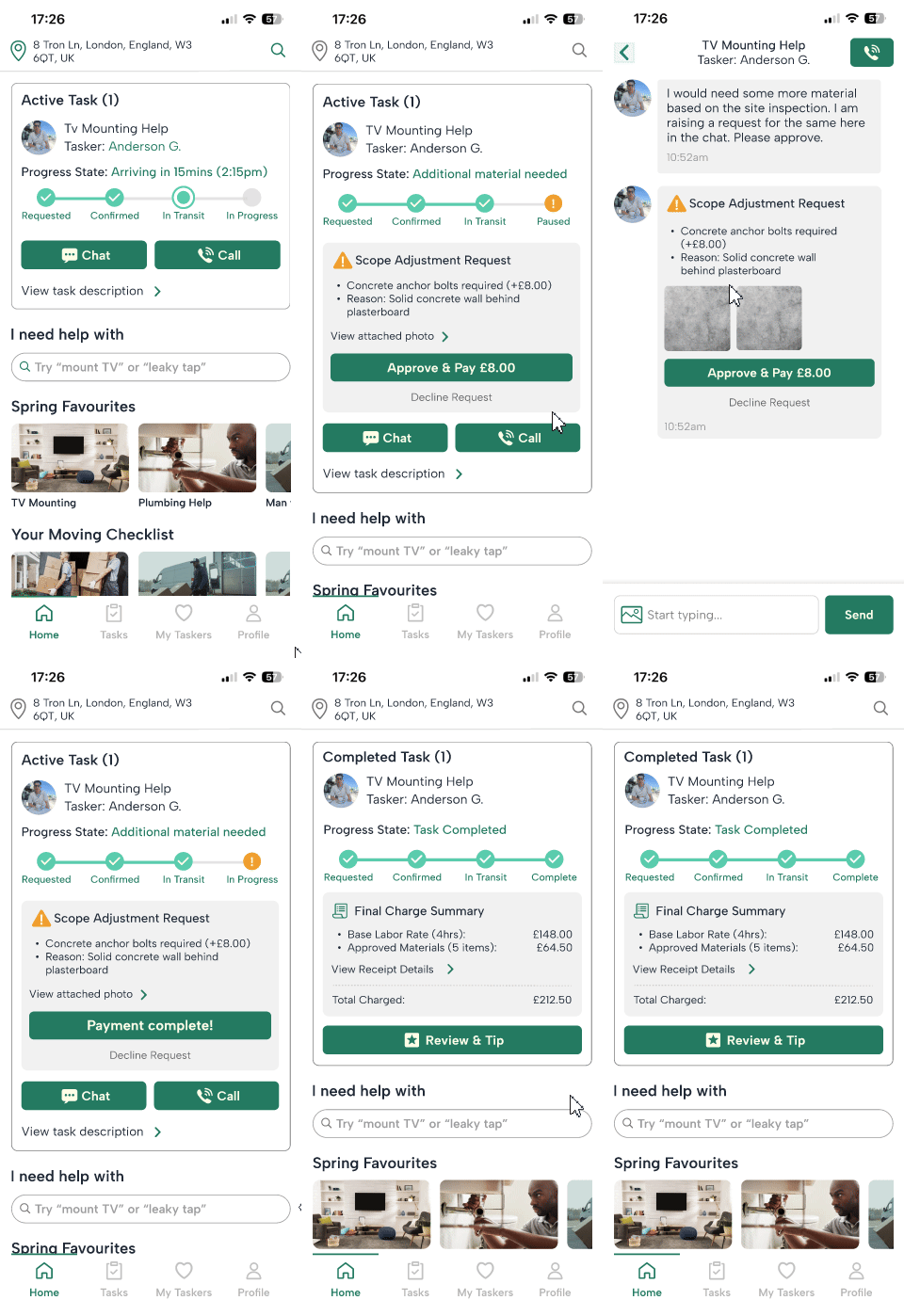
1. Existing Landing Screen in Task Rabbit
2. Live task update displayed on the home screen
3. Updated display of scope change in the current ongoing task
4. Scope change message in chat that appears as a system message
Feature Overview
1. Home Screen Active Card (Dynamic Control Hub)
-
Real-Time Stepper: Dynamically shifts to an alert state (!) with status text "Additional material needed".
-
Inline Scope Alert: Surfaced inner container (#FFFFFF, 12px radius) showing itemized costs (+£8.00) and rationale upfront.
-
1-Tap Action: Integrated full-width CTA (Approve & Pay £8.00) eliminates multi-step navigation.
2. Chat Thread System Card (In-Context Approval)
-
Structured System Block: Replaces informal text messages with an isolated, full-width transactional card.
-
Tappable Proof: Inline 1:1 image thumbnails with tap-to-expand affordances for instant evidence verification.
-
Component Parity: Mirrors the exact same Approve & Pay primary CTA used on the Home Card.

Logic flow for additional scope cost approvement across home screen and chat
Positive Flow: When user accepts the additional scope increase in terms of work or material requirements

1. Default task progression widget
2. Scope change on the active task gets notified to the user on home screen and chat
3. Additional material cost approved by user
4. Final charge summary appears along with option to rate the tasker
Negative flow: When user denies with the additional scope or material requirements raised by the tasker

3. User decides to deny the request for material
4. Once user denies the request for additional material it gets updated across both the home screen and the chat
1. Default task progression widget
2. Scope change on the active task gets notified to the user on home screen and chat
Scope Adjustment & Payment Motion Mechanics
To demonstrate mid-job financial transparency and real-time state synchronization, this prototype validates the low-friction approval flow, surface collapses, and node resolutions:
-
Real-Time Scope Injection: Receiving a mid-job material update injects an inline alert block directly into both the primary active task card and the chat thread, highlighting cost variances (+£8.00) and site visual evidence without context-switching.
-
Stateful Payment Morphing: Tapping Approve & Pay £8.00 immediately morphs the solid CTA into a compact loading pill, locking interaction to eliminate double-charging risks while executing the transaction.
-
Surface Collapse & Stepper Resolution: Upon payment verification, the high-friction action container smoothly collapses into a read-only confirmation chip (Additional Scope Approved). Simultaneously, the 4th stepper node transitions from an amber alert to a green success checkmark (status-success), accompanied by a real-time progress track fill.
Why it works?: This flow keeps the home feed card, chat thread, and final checkout completely synchronized to prevent billing surprises mid-job. When a Tasker requests an extra material cost, the adjustment request appears with attached photo evidence right inside the chat and on the active task card (Scope Adjustment Request). Once the user taps Approve & Pay, both views instantly update to show the pre-authorized addition, seamlessly updating the final task card with a transparent cost breakdown (base labor + approved materials) for a frictionless completion and tip screen.
Measuring Overall Product Success
To evaluate the collective impact of the scope adjustment, cancellation recovery, and chat-to-feed system updates, performance would be tracked against three core product health metrics:
-
Task Recovery & Re-booking Rate: Increase in users who successfully complete mid-task scope updates or accept auto-reassigned Taskers instead of dropping off or requesting refunds.
-
Operational Disruption Churn: Reduction in user drop-off directly following a mid-task issue or Tasker cancellation.
-
Support Ticket Volume: A measurable decrease in disputes regarding unexpected material fees, payment hold confusion, and manual re-booking friction.
Validation Framework
-
Production A/B Test: Benchmark the legacy experience (manual re-booking and unformatted chat messages) against the automated recovery flow. Primary metric: Task completion rate during disrupted bookings.
-
Qualitative Edge-Case Testing: Scenario testing with users navigating high-stress disruptions (e.g., last-minute Tasker cancellations and unexpected +£8 material requests) to measure time-to-resolution, trust, and surface hierarchy clarity.
Future Iterations & Post-Launch Tweaks
-
Dynamic Rate Protection: If a replacement Tasker charges a higher rate during a cancellation recovery, the platform automatically covers the price delta to prevent price-shock friction.
-
Automated Scope Receipts: Require Taskers to upload a quick photo proof for scope add-ons directly within the bottom sheet flow, increasing approval rates and eliminating dispute friction.
-
Smart Chat Prompting: Auto-populate a introductory message from the newly assigned Tasker acknowledging the transferred scope and photos, immediately reinforcing platform trust.
By converting fragmented manual workarounds into proactive platform mechanics, this redesign resolves high-anxiety edge cases while preserving task context. The resulting UI balances visual clarity with technical edge-case mitigation—protecting revenue, reducing operational friction, and driving long-term marketplace retention.